Get the most from your machine
Every material, every setting, all in one place.
This foundation series of short videos walks you through every core skill for cutting our projects with your Cricut. These are the exact studio methods our creative team uses every day, from unzipping your first file to selecting score lines for your project.
Work through all 16 videos with Meagan at your own pace. Come back whenever you need a refresher. And when you are ready to put these skills to work, our full library of cutting machine crafts is waiting for you.
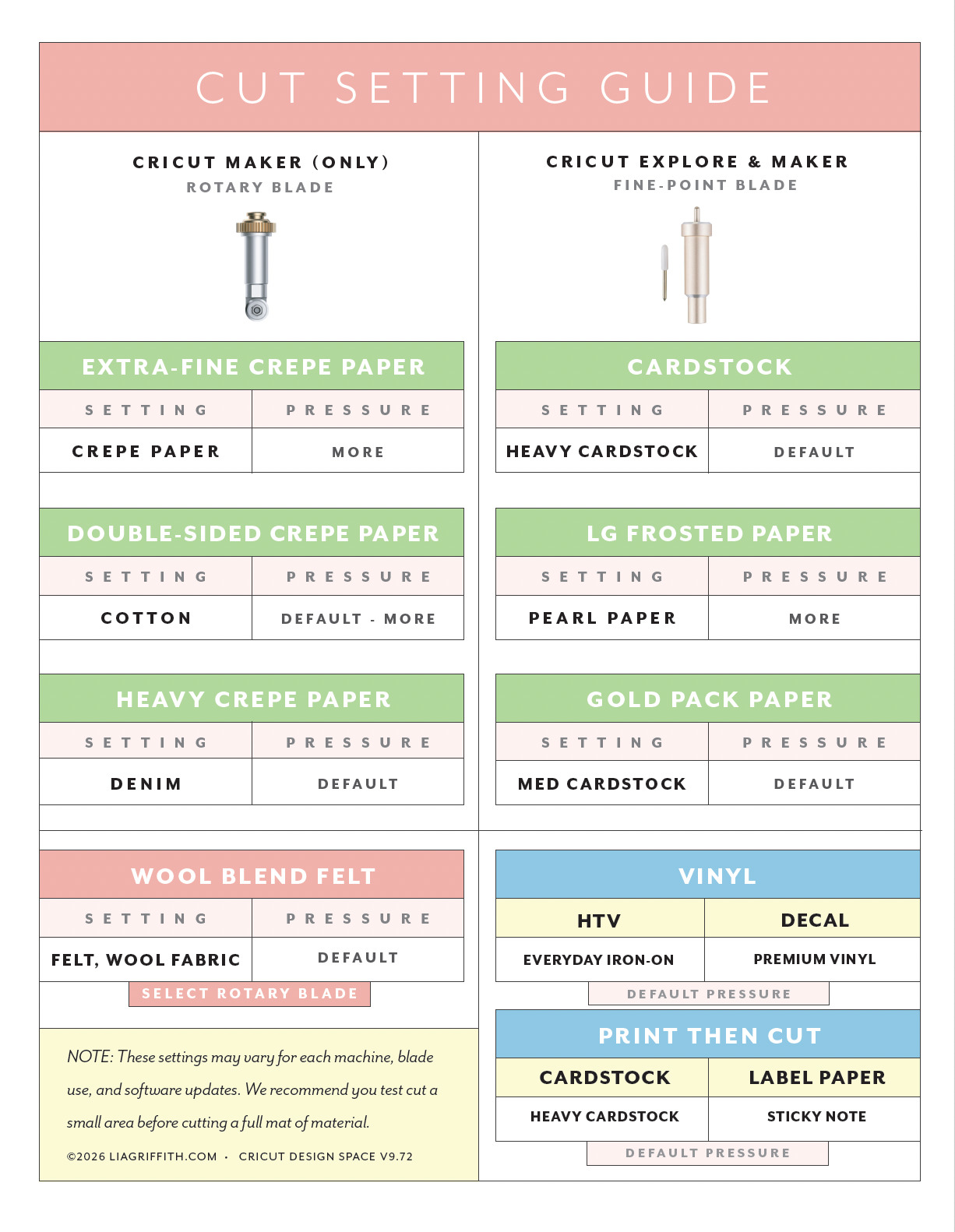
As an easy reference guide, you can download and print the cut setting guide below.
And remember, this series is here for you, always.
OUR RECOMMENDED MACHINE & TOOLS:
Cricut Maker 4 (includes fine point blade)
Rotary Blade
Scoring Wheel
Community Discussion
18 Comments
Very clear and easy to follow
Love hearing that! Meagan is a good teacher. 🙂
I cant get to the bunny files to make it. I thought I already had them saved but I cant find it now! Help?!?!? 🙂
If you have already downloaded the bunny, you can find it in your account under unlocked files. 🙂
You just made print and cut simple!! Thank you!!
Yay! Love hearing that. 🙂
Can I come back anytime and watch this for free?? Goodness, I need an actual workbook to make notes! I am loving this!!
Anytime! Of course, we hope you will join us for a live workshop or fun project too. 😉
Thank you for this class! Even though I have been using my Cricut for about 3 years now, I definitely learned some new tips and tricks! On the Print and Cut video when I try to upload the pdf label file, my Cricut tells me that the file is not compatible. Is it because I am using a Cricut Maker 3? I have the newest software downloaded and tried several times but no luck. Any advice?
Hey there! For the print-then-cut, you will need to use a JPG file. PDF files are just for printing, but to cut by hand.
I find it helpful to turn the “Designer Notes” into guide notes from the dropdown menu. Then they are always there.
Great Videos!
Thanks, Cheryl!
Your titles #7 & #8 should be swapped! 🙂
You are right! Fixed. 🙂
Is this a free course or do you have to pay a subscription price for access?
This is free! As is the Crepe Paper Flowers Foundation Series. 🙂
Love this! What Cricut machine would you recommend? Do you have a link?
Yes! And we should add this into this class. I will do that right now. Here is the link to the machine: https://amzn.to/4wTSKcd